Daman Game Customer Support

The Daman Game customer support is the most important department on our platform. Our helpdesk team maintains perfect professionalism when solving our players’ issues and questions. This dedicated team of experienced support professionals solves various types of issues. They resolve issues like a gaming app not loading, deposits and withdrawals not happening, your favourite game disappearing from the gallery, and many other such problems.

When is it Appropriate to Contact the Daman Game Customer Support?

Mainly, there are three situations where you will need our support team’s assistance (because of which you may need to contact them). We have explained the situations and reasons in the following section:

Account-Related Problems

Financial Transaction Issues

Technical Difficulties

What Are the Ways to Contact the Daman Game Support Team?

You should know the process to contact our support team so that you can quickly reach out to them when needed. Existing players can get extensive support. For new players, you may contact them for reasons like the Daman Game Invite Code entry query during registration or learning about the game types.

There are two ways to contact our support team. We will discuss both methods. We will also discuss the additional methods available to both existing and new players.

Pre-Login Support Access

You can contact our support team even without logging in to your account. You do not have to log in to your account. It is especially useful for those who are not registered and for those who have forgotten their password. Here are the steps.
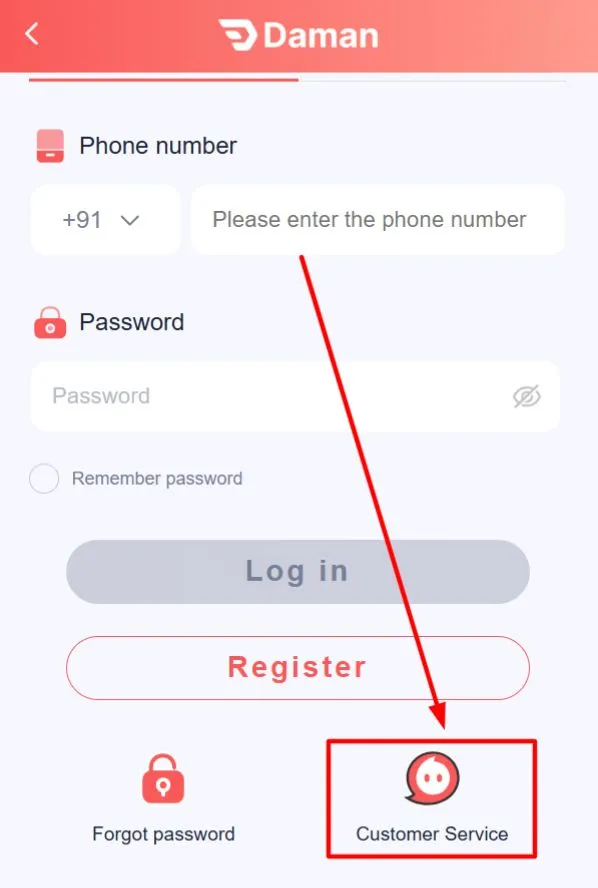
  1. First, you need to open the Downloaded Version or the Web Version of the game and go to the login page.
  2. Scrolling down to find Customer Service button
  3. After the login page opens, scroll down. At the bottom, you will find the “Customer Service” option; click on it.
  4. Scrolling down to find Customer Service button
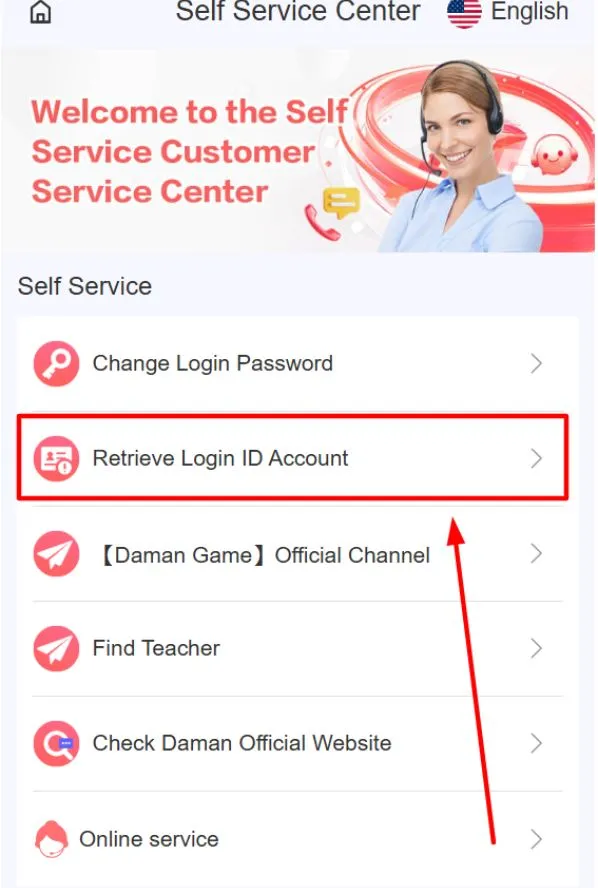
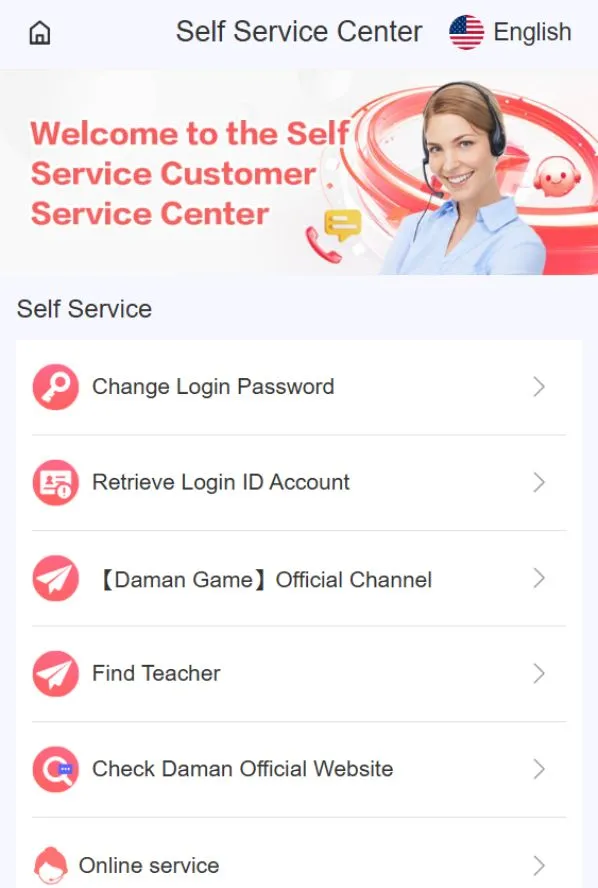
  5. After clicking “Customer Service”, the “Self Service Centre” page will open. On this page, you can find solutions based on your issue.
  6. Self Service Centre page displayed
  7. For example, if you want to retrieve your Login ID, click on the “Retrieve Login ID Account” option.
  8. Selecting “Retrieve Login ID Account” option
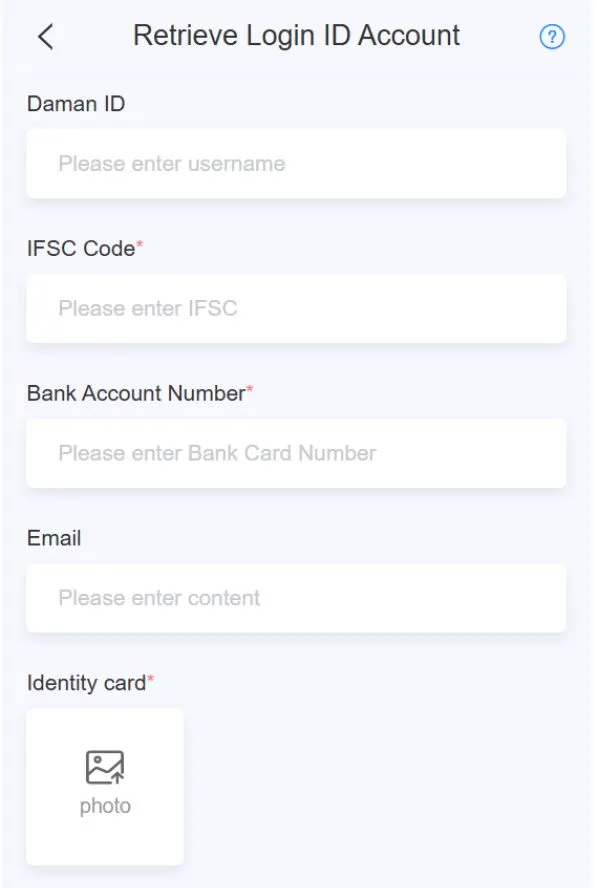
  9. A new page will open where you need to enter all the details related to your issue.
  10. Form page asking for issue detail
  11. After verifying all the details, click the “Confirm” button. Your request will be submitted.

Post-Login Support Options

As a registered account holder and existing player, you can use this post-login support option. You can use the in-app support option to resolve your issues. Use the following steps:
  1. First, you need to log in or start with the Daman Game Register or login process.
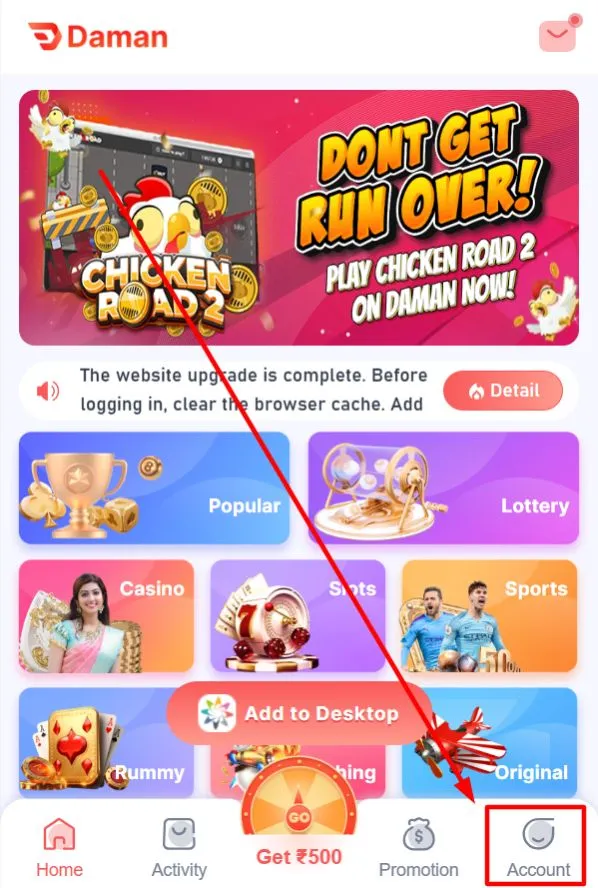
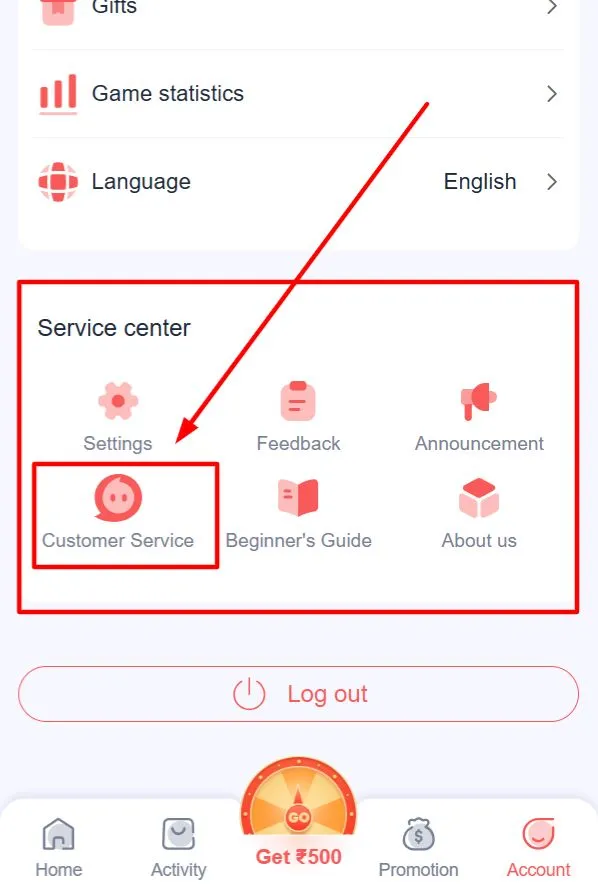
  2. After logging in, you will reach the Home page. At the bottom, you will see the "Account" option. Click on it.
  3. Home page showing the Account option
  4. Once the Account page opens, scroll down. There you will find the "Service Centre" section. Inside it, click on the "Customer Service" option.
  5. Account page with Service Centre section visible
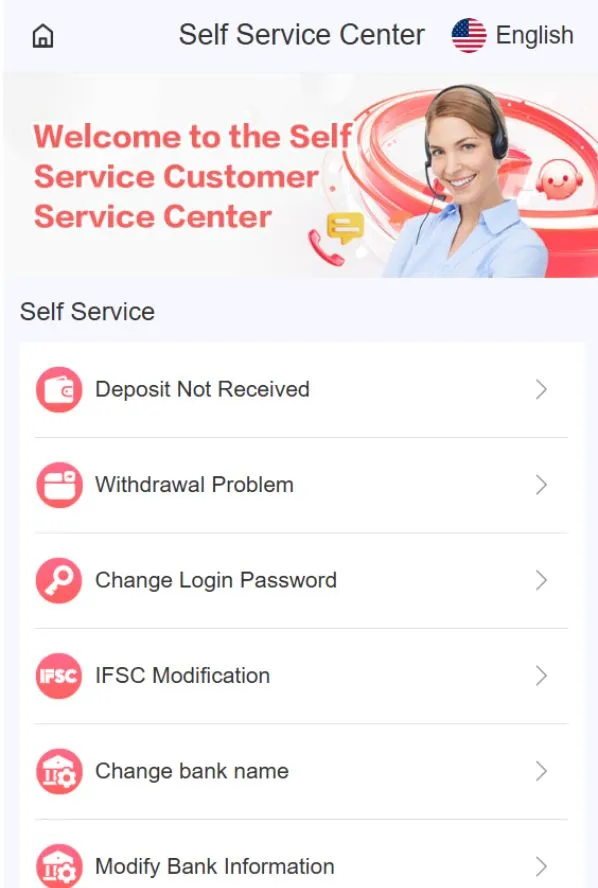
  6. After clicking Customer Service, the "Self Service Centre" page will open, where you can find solutions based on your issue.
  7. Self Service Centre page opened
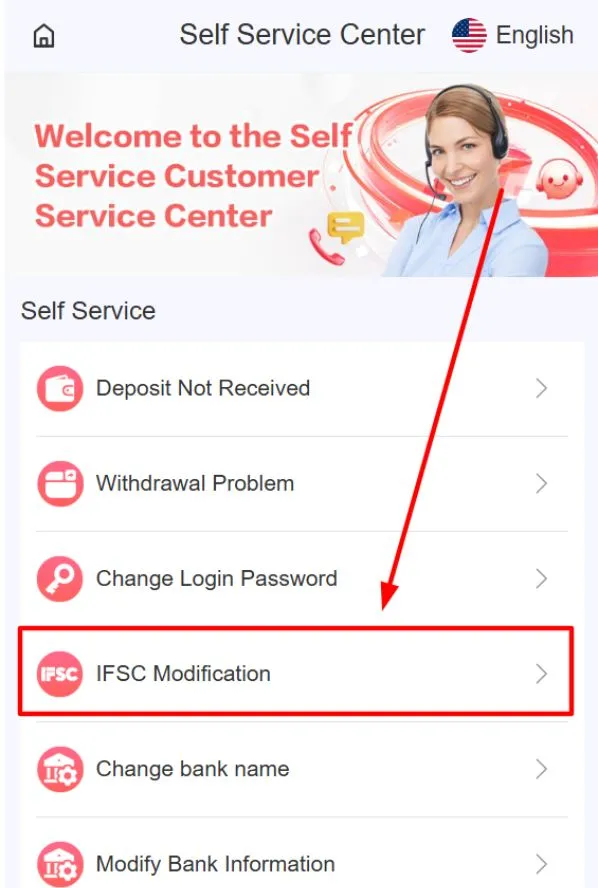
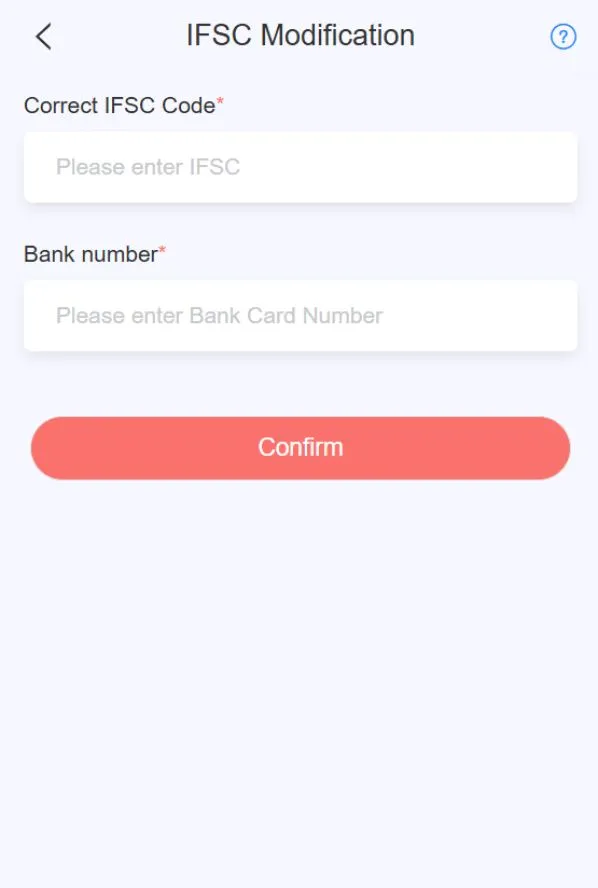
  8. For example, if you have an "IFSC Modification" issue, click on that option.
  9. Selecting the IFSC Modification option
  10. A new page will open where you need to enter the required details.
  11. Form page asking for required details
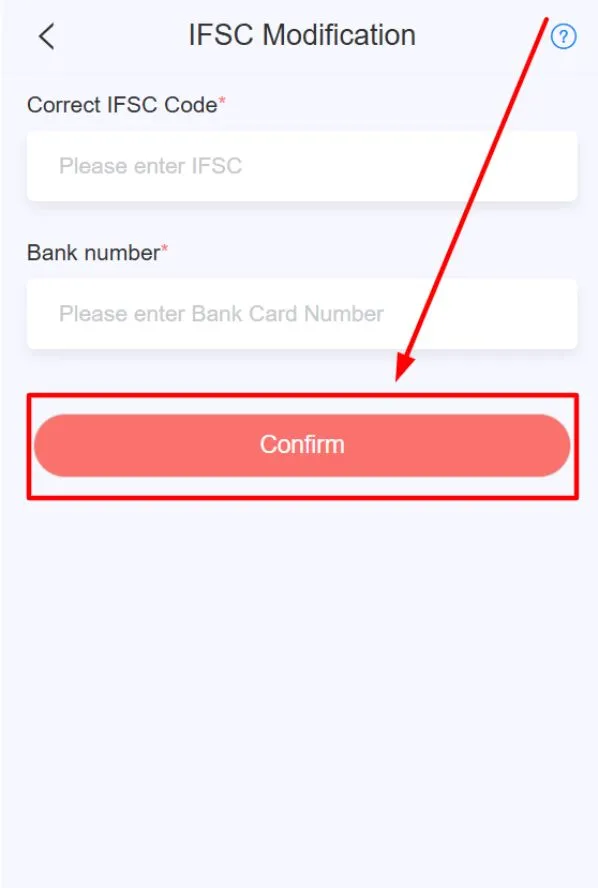
  12. Check all the details and then click the "Confirm" button. Your request will be submitted.
  13. Confirm button pressed to submit the request

Online Service Contact Channel

You can contact our support team using the Online Service available on the Self Service Centre page. Using this option, you can resolve complex issues, including the Daman Game Deposit query, account-related problems, etc. You can use the steps below to contact our support team through this contact channel:
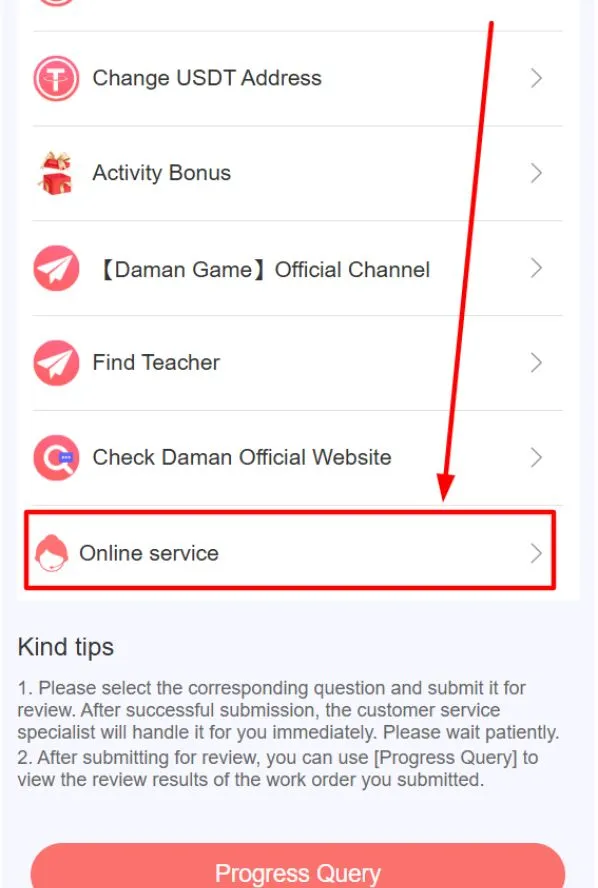
  1. Scroll to the bottom of the Self Service Centre page. There you will find the "Online Service" option. Tap on it.
  2. Scrolling to Online Service option
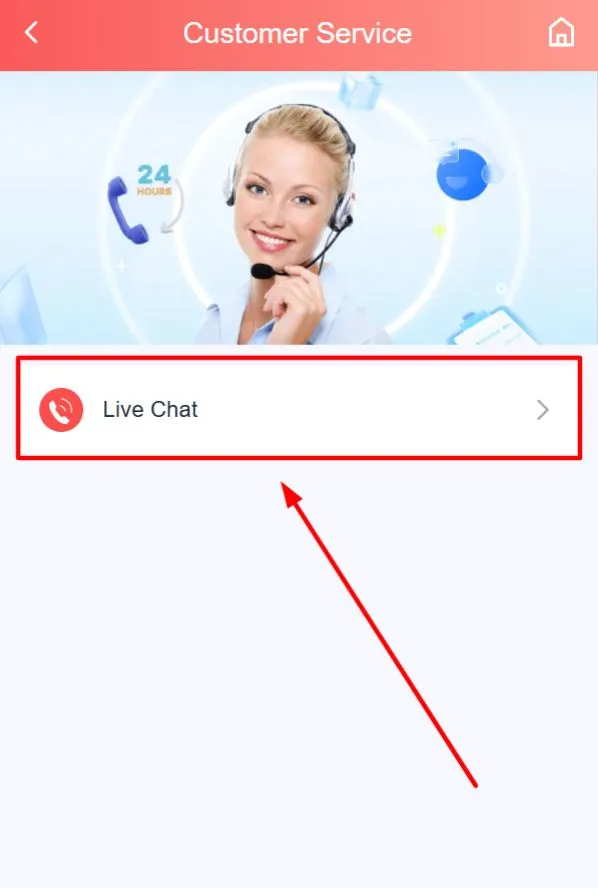
  3. After it opens, the "Live Chat" option will appear on your screen. Click on it.
  4. Tapping the Live Chat button
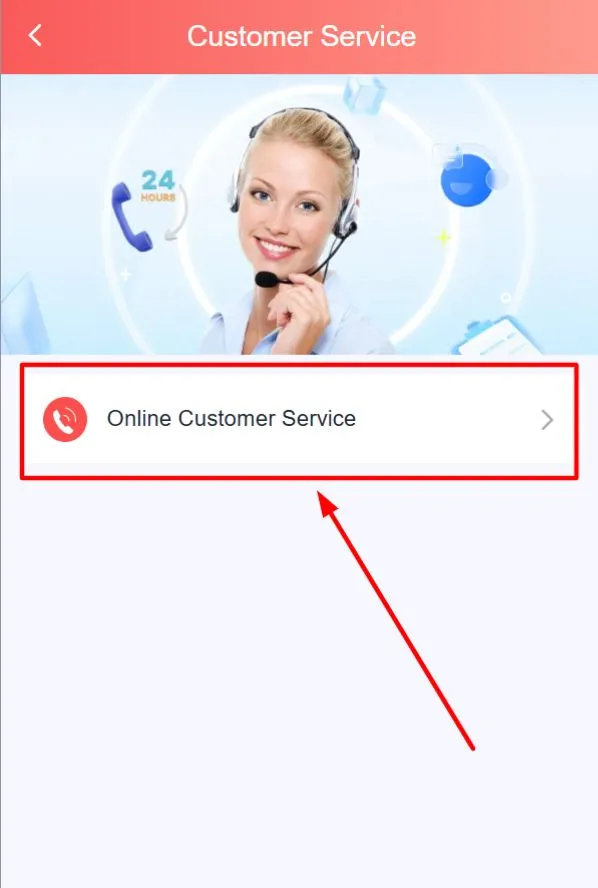
  5. Next, click on the "Online Customer Service" option.
  6. Selecting Online Customer Service
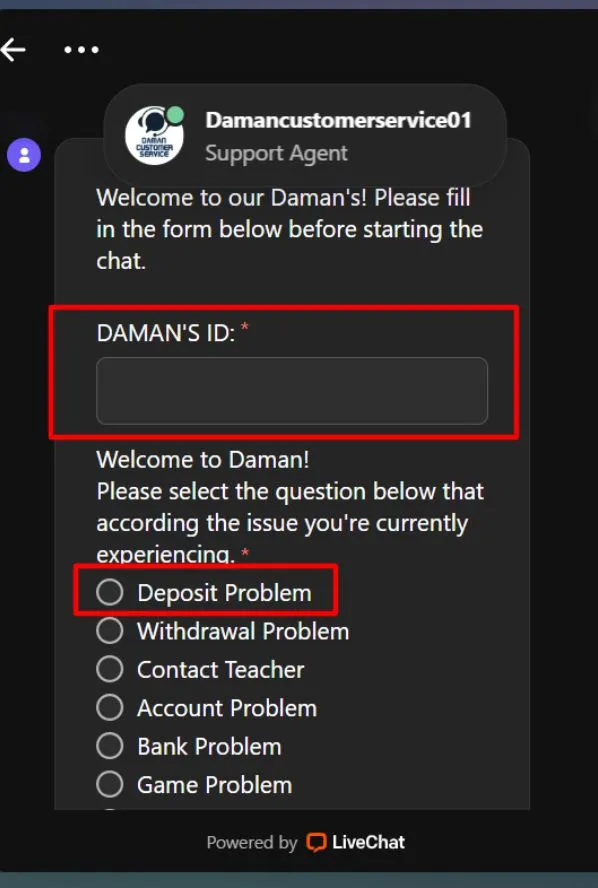
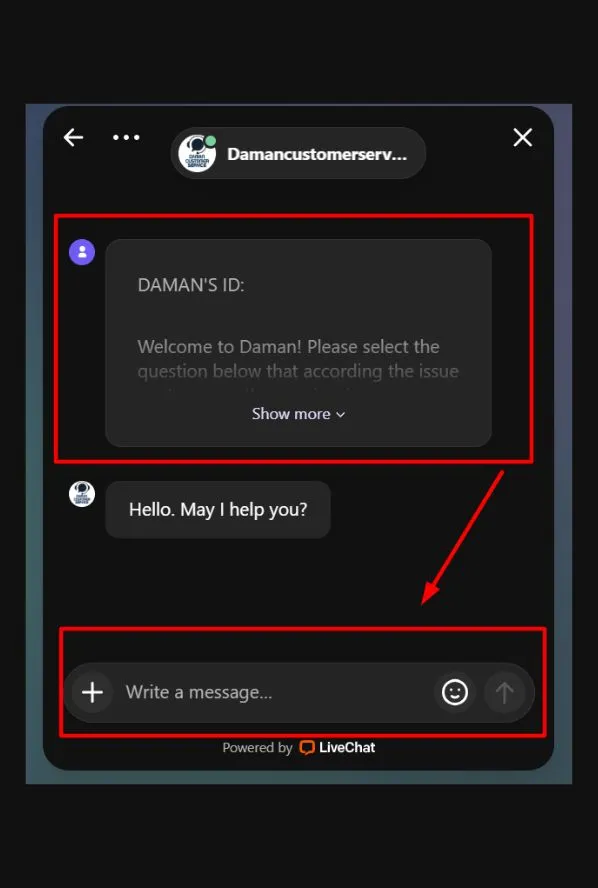
  7. A live chat window will open. Enter your Daman Game ID and select your issue.
  8. Entering Daman Game ID and choosing issue
  9. The live chat will start, and you can ask your questions there. The support team will guide you.
  10.  Live chat window open for support

How Is the Daman Game Customer Service Team Distinct from Others?

For simple and general issues, your Daman Game Teacher, if you have one on your side, is always there to help you. And our support team is unique and different from our competitors in many ways. The following points will prove why our platform outperforms others in the industry:

Round-the-Clock Availability

Multi-Channel Accessibility

Specialized Expertise

Rapid Resolution Framework

Our support team provides rapid resolution to our players’ problems. For that, our customer service department divided the query types among sub-departments based on complexity. So, here is how our support team categorises the issue types:

Issue Complexity Resolution Timeline Examples
Simple Queries 2–4 Hours Password resets, navigation help, etc.
Standard Problems 1–3 Business Days Payment delays, document verification
Complex Matters 3–7 Business Days Security investigations, policy appeals

What Are the Issues You Can Fix without the Daman Game Support Team’s Help?

Account Access Troubles

Payment Processing Concerns

Game Performance Issues

Feature Navigation Confusion

Conclusion

Every customer service, whether in any industry or business domain, plays an important role. Without them, a brand cannot progress properly. As a player, you may face numerous issues, as explained above. To solve them and get your gaming session back on, you need the support team’s assistance. Our support team helps you play your game sessions smoothly.

Through this tutorial, we have explained important things, such as when and how to contact them. We have also mentioned some of the issues you can resolve on your own without contacting the Daman Game customer support department.

Frequently Asked Questions

Can the support team help me change my profile nickname?

Yes, they can! You can also take the help of your Daman Game agent-level player, if you have one, to guide you to change your nickname.

How do I track my submitted support query status?

There is a Progress Query button on the Self Service Centre page. You can visit this tab to review your query status.

Where is the Daman Game customer service portal available?

After logging in to your game app profile, click the Account section and look for the customer service portal below the Service Centre tag.

Can I use online chat for urgent problems?

Yes, you can use the online chat to resolve urgent problems. On your Self Service Centre page, go to the bottom and look for the Online Service. Click it, and it will take you to the Live Chat portal.

What shall I do if I forget my password?

You can use the “Forgot Password” option on the “Log in” screen to reset it. If you cannot do that, you can contact the support team.

Can the support team help me change the language?

It is simple to change. Simply go to the Account section, click the Language tab, and change the medium of communication. If you are unable to do it, contact the Daman Game customer support department.